
Which Features Should You Prioritize in a Password Manager?
For IT administrators in manufacturing, healthcare, finance, and insurance, password management is no longer just about storing credentials. It has become an operational, security, compliance, and productivity challenge. Between hybrid workforces, cloud applications, legacy systems, cyber insurance requirements, and increasing regulatory pressure, managing identities securely has never been more complex.
The reality is that most security incidents still originate from compromised credentials. Whether it’s a phishing attack targeting a hospital employee, a ransomware campaign against a manufacturer, or credential theft impacting a financial institution, passwords remain one of the most frequently exploited attack vectors.
As organizations modernize their infrastructure, IT teams need more than a digital vault. They need password management platforms that integrate with their environment, support modern identity strategies, and scale alongside future business requirements.
Here are the 10 capabilities every organization should look for when evaluating a password management solution.
Seamless Cross-Platform Access
IT teams rarely operate from a single device or operating system. Manufacturing environments often require access from shop floor workstations, corporate laptops, and mobile devices. Healthcare organizations support clinicians, administrative staff, and remote workers. Financial services firms rely on multiple secured endpoints and virtual environments.
A modern password management platform should provide native support across: Windows, macOS, Linux,
iOS, Android, and major web browsers
The experience should remain consistent regardless of device, allowing users to securely access credentials wherever work happens.
Strong Password Generation Without User Friction
One of the biggest challenges facing IT administrators is balancing security requirements with user adoption. While security policies demand unique, complex credentials, users often choose convenience over security. The result is password reuse, predictable patterns, and insecure storage methods. Modern password management solutions should automatically generate:
- Unique passwords
- High-entropy credentials
- Configurable complexity requirements
- Passwords aligned with organizational policies
Removing the burden from employees significantly improves overall password hygiene across the organization.
Enterprise Integration Across Your Technology Stack
A password manager should not operate as another siloed security tool. Organizations increasingly expect solutions that integrate into existing environments and workflows. Look for platforms that work with:
- Microsoft 365
- Active Directory
- Entra ID (Azure AD)
- Single Sign-On (SSO) providers
- Multi-Factor Authentication (MFA) solutions
- Security Information and Event Management (SIEM) platforms
- Managed Service Provider (MSP) management tools
The easier a solution fits into your ecosystem, the faster adoption occurs and the greater the return on investment.
Zero-Knowledge Security Architecture
Trust is critical when storing sensitive credentials. Organizations should prioritize vendors utilizing a zero-knowledge security model, where even the provider cannot view customer passwords or sensitive data. Additional security features should include:
- End-to-end encryption
- AES-256 encryption standards
- Secure key management
- Device-level encryption
- Secure data transmission
For regulated industries like healthcare, finance, and insurance, this level of protection is increasingly becoming a baseline requirement rather than a differentiator.

Secure Credential Sharing with Role-Based Controls
Password sharing continues to be a major operational challenge. For example, Zoho’s State of Workforce Password Security 2026 found that 59% of employees use more than 15 work applications daily, each requiring credentials.
IT teams often need to provide access to:
- Shared administrative accounts
- Service accounts
- Vendor portals
- Financial systems
- Clinical applications
- Manufacturing control systems
Instead of exposing passwords through email, spreadsheets, or chat applications, organizations should leverage secure sharing capabilities that provide:
- Permission-based access
- User-level auditing
- Access expiration controls
- Administrative oversight
Security and collaboration should coexist. The report also lists the following issues often seen as one of the reasons IT/OT teams lean to procure a password management system, especially in small to medium enterprises.
- Password Sprawl
Employees use credentials across an expanding number of business applications, increasing the burden on IT teams to secure and manage access. - Credential-Based Risk
Weak, reused, or exposed passwords can create preventable entry points for unauthorized access and cyberattacks. - Limited Access Visibility
Without centralized password management, IT teams may struggle to see who has access to which credentials, applications, and client environments. - Inconsistent Security Practices
Disconnected password habits and tools make it difficult to enforce consistent security policies across teams and customers. - Growing Administrative Burden
Manual credential management creates additional work for IT teams and makes secure access harder to scale. - Multi-Client Complexity
Managed service providers need a practical way to organize credentials, separate client access, and maintain control across multiple customer environments.
Cloud-Based Synchronization Designed for Hybrid Work
Today’s workforce expects seamless access from anywhere. Password management solutions should securely synchronize credentials across devices while maintaining strong encryption and access protections. For organizations with remote employees, distributed manufacturing sites, branch offices, or regional healthcare facilities, secure synchronization is no longer optional.
“The ability to access credentials from any approved device dramatically improves productivity while reducing security risks associated with shadow IT, ”
– David Bellini, CEO, CyberFOX
Credential Monitoring and Security Insights
Many IT teams don’t realize credentials have been compromised until after an incident occurs. Advanced password management platforms now provide visibility into credential risks through features like:
- Breached password detection
- Dark web monitoring
- Password health scoring
- Reuse identification
- Weak credential alerts
These capabilities allow organizations to proactively reduce risk before attackers exploit exposed credentials.
Business Continuity and Recovery Capabilities
One often overlooked consideration is what happens when users lose access to their accounts.
Healthcare providers cannot afford delays accessing critical systems. Financial organizations require uninterrupted operations. Manufacturers depend on uptime to maintain production schedules.
A modern password platform should provide:
Secure account recovery workflows
Administrative recovery options
Emergency access procedures
Backup and restoration capabilities
Business continuity should extend to identity and credential management.
Support for Passkeys and Passwordless Authentication
Organizations planning for the future should evaluate password managers based on their ability to support emerging authentication standards.
As passkeys and passwordless authentication continue gaining adoption, IT leaders should avoid deploying solutions that lock them into legacy password workflows.
Forward-looking platforms should support:
Passkey management
FIDO2 standards
Biometric authentication
Hardware security keys
Passwordless sign-in methods
The future of identity management extends far beyond passwords alone.
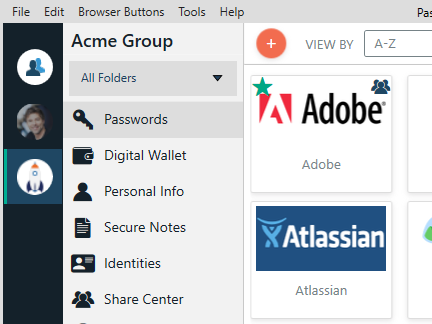
Scalability for Security Maturity Growth
The needs of a 100-user manufacturing company differ greatly from those of a 10,000-user healthcare network. Organizations should choose solutions that can evolve as security programs mature. Future-ready password management platforms should support:
- Centralized administration
- Granular policy management
- User lifecycle management
- Audit reporting
- Compliance requirements
- Multi-tenancy capabilities
- Identity security expansion initiatives
A solution that meets today’s requirements but cannot adapt tomorrow will ultimately create more operational challenges.
The Bottom Line
Password management has evolved from a convenience tool into a critical component of modern cybersecurity strategy.
For IT leaders in manufacturing, healthcare, finance, and insurance, the discussion should no longer focus solely on password storage. Instead, evaluate platforms based on how well they integrate into your environment, support compliance requirements, reduce user friction, and prepare your organization for a passwordless future.
The most effective solutions help organizations strengthen security while simplifying administration, improving user productivity, and supporting broader identity and access management initiatives.
Because in today’s threat landscape, securing credentials has gone beyond just an IT task. It’s a business imperative.
Interested in learning more about Password Boss? Start a free, 14-day trial today.
Interested in learning about privilege access management? Learn about our PAM solution here.